


Shopify + Instagram: How to Set Up the Perfect Integration
Learn how to link your Shopify store to Instagram in 2025. Follow our step-by-step guide to turn Instagram into a fully shoppable channel.

.avif)

Instagram has transformed from a simple photo-sharing app into one of the world’s most influential eCommerce platforms. It has become a digital marketplace where discovery, engagement, and sales happen simultaneously. If you’re a Shopify store owner, knowing how to link Shopify to Instagram is one of the smartest business moves you can make.
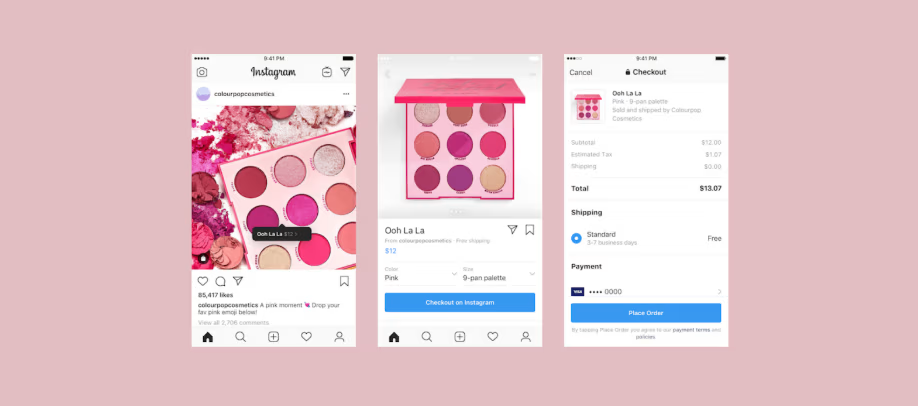
By connecting your Shopify store to Instagram, you unlock an integrated shopping experience that turns your posts and reels into shoppable storefronts. Followers can browse, tap, and purchase without ever leaving the app — creating a frictionless path from inspiration to checkout.
In this guide, you’ll learn everything about setting up the perfect Shopify-Instagram integration — from eligibility requirements and step-by-step setup to optimization strategies that drive real sales. Whether you’re an eCommerce beginner or an established brand, this article will help you transform your Instagram feed into a revenue-generating engine.
Why Linking Shopify to Instagram Matters
Instagram’s strength lies in its ability to blend visual storytelling with seamless shopping. When users see your products in action — styled in real-life settings or worn by influencers — they’re not just browsing; they’re imagining themselves owning it. That emotional connection drives higher conversions than traditional ads ever could.
Here’s why learning how to link Shopify to Instagram is crucial for any growing business:
- Sell Where Your Customers Spend Time : People spend hours scrolling on Instagram daily. By connecting your Shopify store, you meet them where they already are — turning casual scrollers into paying customers.
- Shorter Purchase Journey: Instead of sending users to an external website, they can buy directly through Instagram’s in-app checkout. The fewer steps between interest and purchase, the higher the conversion rate.
- Automatic Catalog Syncing: Once you integrate Shopify and Instagram, your entire product catalog updates automatically. That means no manual uploads or outdated listings.
- Powerful Visual Merchandising: Instagram’s visual nature allows you to showcase your products in lifestyle settings. Tagging products in real photos makes them feel tangible and desirable.
- Data-Driven Growth: Through Shopify and Meta analytics, you can track how Instagram users interact with your products, measure ROI, and fine-tune your marketing strategy.
In short, integrating Shopify with Instagram is about more than convenience — it’s about creating a modern, conversion-ready sales ecosystem.
What You Need Before You Begin
Before you dive into the setup, a few requirements must be in place. Think of this as your integration checklist:
- A Live Shopify Store: Your online store should be fully functional with active products, pricing, and payment gateways enabled.
- An Instagram Business or Creator Account: Instagram Shopping features are only available for business or creator profiles, not personal accounts. Switching is quick and free in the app settings.
- A Linked Facebook Page: Instagram Shopping runs on Meta’s Commerce Manager, which connects to a Facebook Page. Make sure your brand page is active and linked to your business.
- Meta Commerce Manager Account: You’ll use this to manage product catalogs, review insights, and approve your shop for Instagram shopping.
- Compliant Products and Country Eligibility: Check that your products align with Meta’s commerce policies (no restricted or prohibited items) and that your country supports Instagram Shopping.
Once these boxes are ticked, you’re ready to move into setup mode.
Step-by-Step: How to Link Shopify to Instagram
Setting up Shopify with Instagram is straightforward when you follow the right sequence. Let’s break it down.
Step 1: Switch to a Professional Instagram Account
- Open Instagram on your mobile device.
- Go to Settings → Account → Switch to Professional Account.
- Choose Business and fill in your business category, contact details, and website link.
- Double-check that your username, bio, and visuals match your Shopify store branding.
A professional account unlocks analytics, ad options, and — most importantly — Instagram Shopping.
Step 2: Connect Instagram to Your Facebook Page
- In your Instagram app, go to Settings → Business → Connect Facebook Page.
- Select the Facebook Page associated with your Shopify store.
- Make sure both accounts use the same email address or business manager.
Consistency matters — it helps Meta verify that your shop is legitimate and avoids sync errors later.
Step 3: Add Facebook & Instagram Sales Channel in Shopify
- In your Shopify Admin, click Settings → Sales Channels → Add Sales Channel.
- Select Facebook & Instagram by Meta.
- Log in with your Meta account and connect your Facebook Page and Instagram profile.
- Approve permissions for catalog access and data sharing.
Shopify will automatically create a Commerce Manager catalog that links your store’s inventory to Instagram.
Step 4: Enable Instagram Shopping
- Once your accounts are linked, go to your Facebook & Instagram sales channel in Shopify.
- Your product catalog will begin syncing automatically.
- Wait for Meta to review and approve your shop (this usually takes 24–48 hours).
- When approved, open Instagram → Settings → Business → Shopping and select your product catalog.
You’ll now see the “Shopping” tab appear on your profile — confirmation that your integration is active.
Step 5: Tag Products in Posts and Stories
Now comes the fun part — turning your content into conversions.
- Create a new post, story, or reel.
- Tap Tag Products and choose from your synced Shopify catalog.
- Add up to five tags per image or twenty per carousel post.
- Position tags naturally so they don’t clutter visuals.
- Publish and monitor engagement via insights.
Product tags make shopping effortless for customers and keep your posts visually appealing.
Optimizing the Shopify + Instagram Integration
Connecting your store is only the beginning. Optimization turns that connection into sales growth. Here are best practices to elevate performance:
1. Use High-Quality Visuals
Instagram is a visual-first platform, so every image must tell a story. Use consistent lighting, cohesive colors, and professional photography to represent your brand. Lifestyle photos — showing real people using your product — perform far better than plain catalog shots.
2. Craft Engaging Captions
Don’t treat captions as afterthoughts. Pair your visuals with a copy that informs and inspires action.
Example:
“Ready for your next adventure? Tap the tag to grab your travel-ready duffle before it’s gone!”
Mix product highlights, storytelling, and calls-to-action for a balanced caption that sells naturally.
3. Take Advantage of Reels and Stories
Instagram Reels are currently prioritized in the algorithm. Create short, engaging videos that show your product in motion — unboxings, tutorials, or transformations. Add product tags and trending audio to boost reach. Stories can also feature shoppable stickers that drive instant sales.
4. Run Targeted Instagram Ads
From your Shopify dashboard, you can create ad campaigns directly integrated with Meta Ads Manager. Use:
- Dynamic Product Ads to automatically showcase items users viewed on your store.
- Lookalike Audiences to reach new potential customers who resemble your existing buyers.
- Retargeting Ads to remind people of abandoned carts.
Because your Shopify catalog syncs automatically, your ad creatives stay up-to-date without manual input.
5. Monitor Analytics and Optimize
Track these key metrics:
- Product tag clicks
- Instagram referral traffic to Shopify
- Conversions from Reels or Stories
- Top-performing products by engagement
Review results weekly and adjust campaigns accordingly. Over time, you’ll see which visuals, captions, and hashtags drive the most revenue.
Troubleshooting Common Issues
Even with a flawless setup, minor issues can occasionally pop up when connecting Shopify to Instagram. The good news is that most of these problems have quick and simple solutions. Here’s how to handle them effectively and keep your integration running smoothly.
1. Product Catalog Not Syncing
If your products aren’t showing up in Instagram Shopping, the first thing to check is whether they’re properly configured in Shopify. Go to your Shopify Admin and ensure that each item is marked as “Available on Facebook & Instagram.” Every product must also include essential details like images, pricing, descriptions, and available inventory. Missing or incomplete information often prevents the catalog from syncing correctly.
2. “Shopping” Option Missing in Instagram Settings
Sometimes, after setting everything up, the “Shopping” option might not appear in your Instagram settings. Don’t worry — this usually means your account is still under Meta’s review process. Reviews can take up to 48 hours as Meta checks your eligibility and product catalog for compliance. You can check your review status through Meta’s Commerce Manager. Once approved, the shopping feature will appear automatically.
3. Product Tags Not Appearing in Posts
If you can’t tag products in your Instagram posts or stories, double-check that you’re using a Business or Creator account, not a personal one. Instagram Shopping features aren’t available on personal profiles. Also, ensure your product catalog has been approved and linked to your account through Shopify’s Facebook & Instagram sales channel. Once these conditions are met, the tagging feature will become available.
4. Inconsistent Branding Across Platforms
Brand mismatches are another common hiccup that can disrupt your integration or delay approvals. Make sure your business name, logo, and contact information are identical across Shopify, Instagram, and Facebook. Meta’s systems cross-verify brand consistency, and discrepancies can cause sync errors or account review delays. Keeping your brand presentation uniform also builds customer trust and professional credibility.
5. When All Else Fails
If you’ve checked all these factors and the issues persist, a quick reset often does the trick. Disconnect your Facebook & Instagram channel inside Shopify, then reconnect it from scratch. This refreshes your data connection and resolves most lingering sync problems automatically.
Taking these steps ensures that your Shopify-Instagram integration works seamlessly — so your customers can shop your products smoothly without interruptions.
Advanced Tips for Better Results
Once your integration is running, these advanced tactics help boost ROI:
- Schedule Posts Strategically: Post during high-traffic times (typically early morning and evening). Use Shopify’s built-in scheduling tools or third-party apps to plan content ahead of sales campaigns.
- Use User-Generated Content (UGC): Encourage customers to share photos of your products and tag your account. Resharing UGC builds authenticity and social proof.
- Create Collection Highlights: Organize Instagram Highlights by product categories — e.g., “Best Sellers,” “New Arrivals,” “Gift Ideas.” This acts as a mini-catalog on your profile.
- Collaborate with Influencers: Partner with influencers who align with your niche. Allow them to tag your products directly, driving exposure to warm, trusting audiences.
- Leverage Spocket for Product Variety: Use Spocket to source trending, high-quality products from US and EU suppliers. When your inventory is reliable and ships fast, your Instagram store maintains customer trust — especially crucial for impulse buyers during social shopping.
Why Shopify + Instagram Integration Boosts Sales
Connecting Shopify to Instagram is about building an ecosystem that converts social engagement into tangible revenue. Here’s how the two platforms complement each other:
- Shopify handles the backend — product listings, pricing, inventory, payments, analytics.
- Instagram provides the front-end — discovery, storytelling, and visual influence.
Together, they deliver a customer journey that feels natural: see → tap → buy. You eliminate friction while creating an experience that feels intuitive to mobile users — the group most likely to shop through social media.
Common Mistakes to Avoid
Linking Shopify to Instagram can unlock incredible opportunities for brand growth — but only if done strategically. Many store owners rush through setup or focus only on promotions, missing out on the long-term benefits of consistent branding and engagement. To help you stay ahead, here are the most common mistakes to avoid when managing your Shopify-Instagram integration.
1. Inconsistent Branding
Your brand identity should look and feel the same across every platform. Using different logos, colors, or tones between your Shopify store and Instagram profile can confuse potential customers. For instance, if your Instagram profile uses a casual, modern tone but your Shopify store feels formal or outdated, it creates a disconnect that weakens trust.
Keep your visuals cohesive — use the same profile picture, color palette, and voice across both platforms. A unified brand image builds recognition, reinforces professionalism, and helps followers instantly identify your products in their feed. Remember: consistency equals credibility.
2. Ignoring Mobile Optimization
Instagram is a mobile-first platform, which means almost all your potential customers will browse your store using their phones. If your Shopify store isn’t optimized for mobile, you risk losing conversions even after a successful product tag click.
Make sure your store loads quickly, images scale properly on smaller screens, and the checkout process is simple and intuitive. Avoid cluttered layouts or tiny buttons that make navigation difficult. A smooth mobile experience keeps visitors engaged and increases the likelihood of completing a purchase.
3. Overposting Promotions
While it’s tempting to use Instagram purely to drive sales, posting constant promotions can feel pushy and lead to audience fatigue. Followers tune out repetitive “Buy Now” or “Limited Offer” captions, reducing overall engagement and visibility in Instagram’s algorithm.
Instead, strike a balance between promotional and lifestyle content. Share behind-the-scenes videos, customer stories, or tips that show how your products fit into everyday life. Think of your Instagram as an extension of your brand’s personality, not just an online billboard. The goal is to build relationships first — the sales will naturally follow.
4. Neglecting Analytics
One of the biggest mistakes eCommerce owners make is relying on instinct instead of insights. Guesswork doesn’t scale. Both Shopify and Instagram offer built-in analytics tools that show what’s working and what’s not.
Track key metrics such as engagement rates, link clicks, product tag taps, and sales conversions. Identify which posts drive the most traffic to your Shopify store and replicate their format or timing. Data-driven decisions help you allocate ad spend wisely and fine-tune your content strategy for better ROI.
5. Delaying Customer Responses
In today’s fast-paced social environment, Instagram DMs are an extension of your customer service desk. Many shoppers will message you directly to ask about product details, availability, or shipping — and how quickly you reply can make or break a sale.
Respond promptly, even if it’s a simple acknowledgment or automated message letting them know you’ll follow up soon. Fast responses not only boost conversions but also improve your reputation for reliability. Consider setting up quick replies or chat automation in Meta Business Suite to handle common questions efficiently.
Measuring Success
Success in social commerce goes far beyond gaining likes or followers — it’s about generating measurable business growth. When you connect Shopify and Instagram, every interaction can be tracked, analyzed, and improved. To make the most of your integration, it’s essential to focus on performance metrics that reflect real results, not vanity numbers.
Here’s how to effectively measure success and continuously optimize your strategy for long-term profitability.
1. Track Traffic from Instagram to Shopify
The first sign that your Shopify + Instagram integration is working is increased traffic to your store. By analyzing how many users visit your Shopify site through tagged posts, Stories, or your bio link, you can understand which types of content drive the most engagement.
Use Shopify Analytics or tools like Meta’s Insights to view referral sources and click-through rates. If you notice certain post formats (like Reels or carousel posts) generating more traffic, double down on those. Traffic quality matters more than volume — your goal is to attract visitors who are genuinely interested in buying.
2. Measure Sales Generated Through Tagged Posts
The biggest advantage of linking Shopify to Instagram is that customers can shop directly through product tags. Keep track of how many purchases come from these shoppable posts or stories.
In Shopify’s dashboard, you can see how much revenue was driven by Instagram interactions. This helps identify your best-performing products and optimize future campaigns. For example, if one tagged post outperforms others, analyze its visuals, captions, and posting time — then replicate that success formula across new content.
3. Monitor Ad Conversion Rates
If you’re running Instagram ads through Shopify or Meta Ads Manager, pay close attention to conversion rates. This metric shows how many people not only viewed your ad but completed a desired action, such as clicking “Shop Now” or making a purchase.
A good conversion rate indicates that your visuals, targeting, and call-to-action are aligned. If results are low, test different creatives or audiences. Because Shopify and Instagram are directly integrated, your data flows seamlessly, allowing you to test and improve campaigns in real time.
4. Track Repeat Purchase Rate
A truly successful Shopify + Instagram strategy doesn’t just generate one-time sales — it builds repeat customers. Keep an eye on your repeat purchase rate to see how many Instagram customers return for a second or third order.
This metric is crucial because retaining existing customers is far more cost-effective than acquiring new ones. You can boost retention by engaging followers regularly, running loyalty programs, or sending personalized offers to past buyers. When customers feel connected to your brand on Instagram, they’re more likely to shop again.
5. Set Measurable Goals and Benchmarks
Don’t just collect data — use it to guide your strategy. Set clear, measurable goals every quarter to keep your marketing efforts focused. For example:
- Increase product tag clicks by 20%
- Grow Instagram referral sales by 15%
- Improve ad conversion rate by 10%
Review these metrics at the end of each quarter using Shopify’s analytics dashboard and Instagram Insights. Consistently tracking progress helps you identify trends, allocate budgets wisely, and make informed decisions that drive continuous growth.
Conclusion
In an age where attention spans are short and convenience rules, the combination of Shopify and Instagram gives you the ultimate edge. You’re not just posting products — you’re creating a seamless shopping journey that connects discovery to checkout in seconds.
Learning how to link Shopify to Instagram is no longer optional; it’s essential for building a modern, scalable eCommerce brand. With Instagram’s visual power and Shopify’s robust backend, your business can reach new audiences, drive more conversions, and strengthen customer loyalty.
And if you’re ready to elevate your store even further, Spocket is your ideal partner. It helps you source premium, fast-shipping products, automate fulfillment, and scale your operations — so you can focus on what matters most: growing your brand and engaging your audience.
Start your dropshipping business today
FAQs About Linking Shopify to Instagram
How do I link my Shopify store to Instagram?
To link your Shopify store to Instagram, switch to an Instagram Business account, connect it to your Facebook Page, and add the Facebook & Instagram Sales Channel in Shopify. Once approved by Meta, you can tag products directly from your Shopify catalog in Instagram posts and stories. This setup enables a seamless shopping experience for your followers.
Why can’t I tag my Shopify products on Instagram?
If you can’t tag products, your Instagram Shopping feature might still be under review or your catalog hasn’t synced properly. Make sure your items are marked “Available on Facebook & Instagram” in Shopify, your Meta Commerce account is active, and your Instagram profile is set to Business or Creator mode.
Is it free to connect Shopify with Instagram?
Yes, connecting Shopify to Instagram is free. However, Shopify and Meta may charge transaction or advertising fees depending on your sales volume or campaign setup. The integration itself — including product syncing and catalog management — doesn’t cost extra.
What are the benefits of linking Shopify to Instagram?
Linking Shopify to Instagram helps you sell directly within the app, increase brand visibility, and shorten the customer journey. It also allows automatic catalog updates, targeted ad campaigns, and detailed sales tracking through Shopify analytics — all of which boost your store’s conversion rates and overall revenue.
How can I improve sales after linking Shopify to Instagram?
Focus on creating visually appealing content and using product tags in posts, Reels, and stories. Combine organic posts with paid Instagram ads for better reach, and engage with followers through DMs and comments. Tools like Spocket can also help by supplying high-quality, fast-shipping products to strengthen your brand reputation and boost repeat sales.


Launch your dropshipping business now!
Start free trial


Related blogs
How to Import Your First Product from Spocket to Shopify
Learn how to connect Spocket with Shopify and import your first dropshipping product step by step, from product selection to pushing it live on your store.

Best Shopify Apps for New Stores Ranked by ROI
Start your Shopify store with high-impact apps that help you source products, win customer trust, recover sales, boost order value, and grow faster.
Complete Shopify Dropshipping Checklist: Free Template for Launching Your Store
Use this Shopify dropshipping checklist to launch your store with the right products, suppliers, pages, apps, SEO, payments, and marketing plan.
