


Cybersecurity for Ecommerce: Protecting Your Store and Customer Data
Learn how ecommerce security protects your store from cyber threats. Discover risks, solutions, best practices, and tools to safeguard customer data.
.avif)

Running an online store today means you’re handling payment data, customer profiles, order history, and app integrations—all of which are valuable to attackers. I’ve seen Shopify and WooCommerce stores get hit by card-testing bots, fake admin logins, and malicious apps that quietly skim checkout data. That’s why ecommerce security isn’t “install SSL and forget it”—it’s a set of controls that protect revenue and trust. In this guide to cybersecurity for ecommerce, you’ll learn the most common ecommerce security threats (account takeover, fraud, malware, API abuse), the real risk of ecommerce breaches, and the exact protections that matter: 2FA, least-privilege access, secure payment flows, WAF + bot protection, monitoring, and vendor/app audits. If you use supplier platforms like Spocket, securing permissions and data sharing is part of security in ecommerce—not optional.
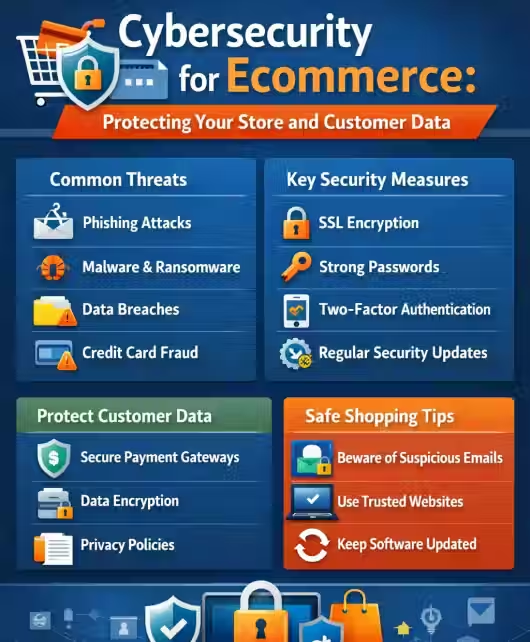
What is Ecommerce Security?
Ecommerce security is everything you do to protect your online store’s money flow (checkout + payments), customer data (names, emails, addresses), and business operations (admin accounts, apps, APIs, inventory, and orders) from attacks and fraud. In real life, “security in ecommerce” usually breaks when a store adds one risky app, reuses passwords, leaves an old plugin unpatched, or ignores sudden spikes in failed checkouts.
Ecommerce cyber security is the set of security controls, monitoring, and response processes used to prevent, detect, and recover from cyber crime in e-commerce—like card testing, account takeover, malware injections, and API abuse—while keeping customer data private and payments trustworthy.
Web security vs ecommerce security (what’s the difference?)
Web security focuses on protecting the website itself (HTTPS, secure headers, preventing XSS/SQLi, DDoS protection). Ecommerce security includes web security plus everything around transactions and trust:
- Payment security + fraud controls
- Customer account protection (logins, 2FA, bot defense)
- Admin/security permissions (staff access, roles)
- App/vendor risk (plugins, integrations, dropshipping tools)
- Order integrity (chargebacks, refund fraud, promo abuse)
- Data privacy + compliance (PCI DSS, GDPR/CCPA where relevant)
Why cybersecurity for ecommerce goes beyond SSL
SSL/HTTPS encrypts data in transit—it doesn’t stop:
- bots hammering your checkout with stolen cards (card testing)
- attackers logging into reused admin passwords
- a compromised app injecting skimmers into your checkout
- API endpoints leaking data
- ransomware or database exfiltration
If you’ve ever seen “hundreds of failed payments in minutes,” that’s a classic e-commerce security risk SSL cannot solve.
Key components of security in ecommerce
Keep it practical—these are the controls that actually move the needle:
- Identity & access: strong passwords, 2FA, least-privilege roles, staff access reviews
- Payment protection: PCI-compliant gateways, 3DS where appropriate, card-testing defense
- Bot + abuse prevention: rate limiting, bot mitigation, CAPTCHA only when needed
- App & vendor security: audit permissions, remove unused apps, review supplier integrations (including Spocket access scopes)
- Vulnerability management: patch themes/plugins, secure configs, regular scans
- Monitoring & response: alerts for admin logins, checkout spikes, file changes, API anomalies
- Backups & recovery: tested restores, not just “we have backups”
Why Cybersecurity for Ecommerce Is More Critical Than Ever
If you are thinking about what is the relevance of cybersecurity for ecommerce, then here are some of the trends that shows why it is vital
Increase in cyber crime in e commerce
Attackers don’t “hack” like movies—they automate. Bots test stolen cards, spray passwords across admin panels, and exploit common plugin flaws. That’s why the security risk of e commerce keeps rising even for small stores.
Expansion of digital payments
More payment options = more fraud angles (chargebacks, wallet abuse, refund fraud). Payment growth is great—until card testing makes your gateway flag you and checkout conversions drop.
Growth of dropshipping and third-party integrations
Modern stores run on integrations: apps, analytics, fulfillment, email tools, supplier platforms. Each one is a potential weak link. If you use dropshipping tools or Spocket, treat app permissions and API access like keys to your store—because they are.
AI-powered attacks
Phishing has gotten more convincing and more personal. AI also helps attackers generate realistic fake support chats, order disputes, and “vendor emails” that trick teams into handing over access.
Remote operations and cloud-based systems
Remote teams + shared credentials = higher takeover risk. Cloud dashboards and APIs are powerful, but misconfigured access or leaked tokens can expose customers and order data fast.
Top Ecommerce Security Threats in 2026
Below are the ecommerce security threats I see store owners run into most—these directly map to real ecommerce security issues and lost revenue.
Payment fraud and card testing attacks
Bots run thousands of small authorization attempts to validate stolen cards. Symptoms: sudden checkout slowdown, lots of failed payments, your payment provider sending warnings. This is one of the biggest e-commerce security risks because it can get you temporarily blocked.
Phishing and social engineering
Fake “Shopify support,” “bank verification,” or “app partner” emails steal credentials. The target is almost always admin access, payout changes, or API keys.
Malware and ransomware
Skimmers inject scripts into checkout pages to steal card data. Ransomware hits store operations by locking admin systems or stealing customer databases for extortion.
DDoS attacks
Traffic floods that take your store offline during launches or peak sales. Even short downtime can wipe out daily revenue and ad spend ROI.
Account takeover (ATO)
Attackers hijack customer accounts (stored addresses, saved payment methods) or staff/admin accounts. ATO is often the bridge to larger fraud (refund abuse, gift card draining, payout changes).
SQL injection & cross-site scripting
Common in poorly maintained plugins/themes or custom code. These can lead to database theft, session hijacking, and checkout manipulation—classic security issues in ecommerce.
API vulnerabilities
APIs power storefronts, apps, fulfillment, and supplier sync. Weak auth, excessive permissions, or exposed tokens can leak orders, customer data, or inventory. This is a growing security risk of e-commerce as stores rely more on integrations.
Common Ecommerce Security Issues Store Owners Overlook
Most ecommerce breaches don’t start with “elite hackers”—they start with small, easy-to-miss gaps in day-to-day store management. The good news is that fixing these is usually cheaper than dealing with chargebacks, downtime, or a customer-data scare. Here are the security issues in ecommerce I see store owners overlook the most.
Weak passwords and poor admin access control
The fastest way stores get compromised is reused passwords and “everyone is an admin.” If a VA, freelancer, or an old agency still has access, that’s a real e-commerce security risk—especially when admin accounts can change payout settings or install apps.
Do this: use a password manager, remove unused staff accounts monthly, and assign least-privilege roles by default.
Outdated plugins/themes
Outdated themes, abandoned WooCommerce plugins, and old tracking scripts are common entry points for attacks like XSS and SQL injection. Even one neglected plugin can turn into a serious security risk of e commerce.
Do this: schedule monthly updates, delete unused plugins (don’t just deactivate), and avoid tools that aren’t actively maintained.
Lack of 2FA
No 2FA on admin accounts is like leaving the back door open. It won’t prevent every attack, but it stops the most common takeovers cold—making it one of the highest-ROI fixes in ecommerce security.
Do this: enforce 2FA for all staff and store recovery codes securely.
No security monitoring
Many stores only realize they’re under attack after conversion drops, chargebacks spike, or customers complain. Without alerts and logs, you’re reacting late—and that’s when the damage is expensive.
Do this: enable login alerts, watch for sudden checkout failures, and monitor theme/checkout file changes.
Insecure third-party apps
Apps often request broad permissions “just in case,” and one risky app can expose customer data, orders, or admin tokens. In fast-growing stores, apps become the biggest hidden risk of ecommerce.
Do this: audit app permissions quarterly, remove anything unused, and install only apps with clear support and frequent updates.
Improper supplier integrations (dropshipping risk)
Dropshipping adds supplier tools, marketplaces, and fulfillment connections—more API keys and more data sharing. When you connect Shopify with supplier networks (including Spocket), overly broad scopes or leaked tokens can expose orders and customer details.
Do this: limit API scopes, rotate tokens, and review what data each integration truly needs.
The Real Risks of Ecommerce for Businesses
If you’re wondering whether security investments are “worth it,” map them to outcomes. The risk of ecommerce isn’t theoretical—breaches show up as lost money, damaged trust, and operational chaos that can take months to recover from.
- Financial losses: fraud, chargebacks, card-testing penalties, and wasted ad spend during outages are the most immediate e-commerce security risks.
- Brand reputation damage: a single viral complaint about leaked data can undo years of brand-building.
- Legal penalties and compliance exposure: mishandling payment data impacts PCI DSS; customer data mishandling can trigger GDPR/CCPA obligations depending on where you sell.
- Loss of customer trust: account takeovers and “mystery orders” don’t just lose one customer—they raise refund rates and churn.
- Operational downtime: DDoS, compromised admin accounts, or ransomware can freeze orders and fulfillment—classic security issues in ecommerce that stall growth.
Essential Ecommerce Security Measures Every Store Needs
Think of this ecommerce security checklist as your “must-have stack” for cyber security in e-commerce. These are the controls that protect checkout revenue, reduce fraud, and limit damage when something slips through—without turning your store into a slow, annoying experience.
SSL encryption & HTTPS
SSL is the baseline for web security in e-commerce because it encrypts data in transit. But it doesn’t stop bots, fraud, or compromised apps.
Minimum: HTTPS everywhere, secure cookies, and eliminate mixed-content warnings.
PCI DSS compliance
PCI DSS is non-negotiable if you accept card payments. The safest path is to avoid touching raw card data entirely.
Minimum: use tokenized, PCI-compliant payment processing (hosted fields or redirect checkouts).
Secure payment gateways
Gateways differ massively in how well they handle fraud, disputes, and card testing. Choosing a strong gateway is a direct ecommerce security advantage.
Minimum: enable AVS/CVV checks and anti–card-testing protections (velocity rules).
Two-factor authentication
2FA is one of the simplest ways to reduce admin and staff takeovers. It directly lowers your security risk of e-commerce even if credentials leak.
Minimum: enforce 2FA for admins, staff, email accounts, and finance tools.
Web Application Firewall (WAF)
A WAF blocks common attack patterns and filters bad traffic before it hits your store, helping with both security and uptime.
Minimum: WAF + bot mitigation + rate limiting on login, checkout, and search endpoints.
Fraud detection systems
Fraud isn’t just stolen cards—it’s promo abuse, refund scams, and account takeover behavior. Detection tools help you stop bad orders before fulfillment.
Minimum: rules for high-risk orders, suspicious IP/device signals, and unusually rapid checkout attempts.
API security controls
APIs power apps, fulfillment, and supplier syncing. In dropshipping environments, API misuse is a growing ecommerce security threat.
Minimum: least-privilege scopes, token rotation, webhook validation, and anomaly alerts on API calls.
Role-based access control (RBAC)
Not everyone needs admin access. RBAC reduces blast radius when an account is compromised and keeps teams safer as you scale.
Minimum: separate roles for support, fulfillment, marketing, and dev—review access every 30–90 days.
How to Secure a Shopify or WooCommerce Store
If you’re running Shopify or WooCommerce, your baseline platform security is only one piece of ecommerce security. Most real-world breaches happen through weak access control, risky apps, exposed API tokens, or an unprotected checkout flow. The goal is simple: reduce your attack surface, lock down permissions, and catch threats early—before customers or payment providers do.
Secure hosting environment
WooCommerce: your hosting quality directly impacts your security. Cheap shared hosting often means weaker isolation, delayed patching, and limited monitoring.
Shopify: Shopify handles core hosting security, but you’re still responsible for account access, apps, and integrations.
Do this (practical setup):
- Use managed WooCommerce hosting with malware scanning, WAF/CDN support, automatic patching, and DDoS protection.
- Enforce HTTPS across the whole site (not just checkout) and fix mixed content warnings.
- Lock down admin access: unique admin accounts per person, no shared logins, and restricted privileges.
- If you run WooCommerce, add server-level protections like rate limiting and file integrity monitoring.
Choose secure apps only
Apps and plugins are a common cause of security issues in ecommerce because they often get broad access to orders, customers, and store settings. One poorly maintained plugin can introduce XSS/SQL injection vulnerabilities or leak API tokens.
Do this (how to vet apps fast):
- Check update frequency (avoid apps that look abandoned).
- Read recent reviews specifically for issues like “suspicious charges,” “checkout problems,” or “support not responding.”
- Install fewer apps and prefer platforms with strong security documentation.
- Remove unused apps immediately—unused permissions are still permissions.
Monitor API permissions (this is where modern attacks happen)
APIs connect your store to payments, marketing tools, CRMs, analytics, fulfillment, and supplier ecosystems. This is a rising ecommerce security threat because leaked tokens don’t need passwords—they grant direct access.
When connecting Shopify with supplier networks, treat API scopes like access keys to your customer and order data. Your security posture depends on least-privilege access and encrypted data transmission.
Do this:
- Review app scopes/permissions quarterly (and after team changes).
- Revoke old API keys and rotate tokens on a schedule.
- Validate webhooks and log unusual API behavior (sudden spikes, unknown IPs, odd order edits).
- Limit what each integration can read/write—don’t grant “full access” unless absolutely required.
Regular backups (and actually test them)
Backups reduce the blast radius of ransomware, accidental deletions, and plugin corruption—major e-commerce security risks for WooCommerce stores and custom Shopify setups.
Do this:
- WooCommerce: daily automated backups of database + files, stored offsite.
- Shopify: export critical data (products, customers, orders) and back up themes/configs and app data where possible.
- Test restore every quarter (a backup you can’t restore is just storage).
Update themes & plugins
Outdated themes, abandoned plugins, and old scripts are one of the most common causes of security risk of e-commerce. Attackers scan for known vulnerabilities at scale.
Do this:
- Set a monthly patch routine and an emergency update routine for critical fixes.
- Delete unused plugins/themes (inactive still adds risk).
- Avoid “nulled” themes/plugins—these are frequent malware carriers.
Protect the checkout process (your revenue target)
Checkout is where attackers run card testing, inject skimmers, and exploit promo/refund logic. If your checkout gets flagged by a payment provider, it can hurt revenue immediately.
Do this:
- Add bot protection + rate limiting for login and checkout endpoints.
- Enable fraud checks (AVS/CVV, velocity rules, 3DS where it fits).
- Monitor signals like: spikes in failed payments, repeat attempts from same IP/device, unusual coupon use.
- Use a WAF and block suspicious geographies only if it aligns with your customer base (avoid overblocking).
Ecommerce Security Best Practices for Scaling Stores
Scaling increases complexity: more staff accounts, more apps, more vendors, more endpoints. That’s why cyber security in e-commerce has to evolve from “basic settings” into a repeatable operating system. The best teams adopt a risk-based approach (similar to vendor risk frameworks discussed by UpGuard) and pair it with continuous monitoring and anomaly detection concepts commonly emphasized in AI-driven security thinking (like Darktrace’s behavioral focus).
Regular security audits (quarterly, not “when something breaks”)
Audits help you spot silent risk before it becomes downtime or chargebacks.
Audit checklist (high impact):
- Staff/admin access: who has admin, who shouldn’t, and shared accounts
- App permissions: remove unused apps, reduce scopes
- Store settings: payout accounts, email domain security, webhook configs
- Checkout integrity: payment settings, scripts, fraud rules
- Data exposure: what customer/order data is stored and where
Action: track findings in a simple doc and fix the top 5 risks each quarter.
Penetration testing (before peak sales, not after)
Pen testing surfaces real exploitable paths—especially if you have custom code, headless storefronts, or complex WooCommerce setups.
Action:
- Annual third-party test for mature stores
- Before major campaigns: run a vulnerability scan + checkout script review
- Validate that critical issues are patched and re-tested
Employee cybersecurity training (phishing is still #1)
Social engineering is a top cause of ecommerce security threats—especially for finance and admin teams.
Action (make it operational):
- Use compliance training solution to train staff to verify: “payout change requests,” “supplier banking updates,” “urgent app install requests”
- Require approvals for installing apps or changing payment settings
- Use separate admin accounts + 2FA for every team member
Vendor risk assessment (apps, agencies, suppliers)
Every vendor is part of your risk chain. If a vendor is breached, your store can be exposed through shared tokens or integrations—an increasingly common e-commerce security risk.
Action:
- Review vendor access scopes and data handling policies
- Prefer vendors that publish security practices and support fast incident response
- Remove vendors/tools you no longer use (access creep is real)
Cloud security posture management (for modern stacks)
If you use cloud storage, CDNs, or analytics pipelines, misconfigurations can leak data—quietly.
Action:
- Review public access settings (storage buckets, logs, exports)
- Apply least privilege to cloud identities
- Monitor for configuration drift (settings changing over time)
Zero-trust architecture (simple version for ecommerce teams)
Zero trust means you don’t assume trust because someone is “inside the system.” Every access request is verified and limited.
Action (practical zero trust):
- Enforce 2FA everywhere (store, email, finance tools)
- Use role-based access control (RBAC) and approve privilege escalations
- Log and alert on sensitive actions (payout changes, new admin creation, app installs)
Compliance and Legal Requirements in Ecommerce
Compliance is not just legal—it’s a blueprint for reducing breach impact. Good compliance practices lower the risk of ecommerce by limiting data exposure and strengthening processes around payments and privacy. Businesses also consider cyber insurance as part of their risk management strategy to help mitigate financial losses and operational disruptions caused by cyber incidents.
PCI DSS (payment security baseline)
If you accept card payments, PCI DSS matters. Even with Shopify, you can create issues by storing card data in notes, CRMs, or third-party tools.
Actionable PCI habits:
- Use PCI-compliant gateways and tokenized payment flows
- Never store raw card numbers or CVVs anywhere
- Limit who can access payment dashboards
- Keep a record of your payment flow and annual compliance validation
GDPR (EU customer data)
If you sell to EU customers, GDPR expectations include transparency, consent, and controlled data processing.
Do this:
- Publish a clear privacy policy that matches your tools (email marketing, analytics, CRM)
- Support customer requests: access, correction, deletion
- Minimize collected data—don’t capture fields you don’t need
- Secure stored data (encryption, access controls)
CCPA (California privacy requirements)
If you sell to California residents, you must disclose data collection and allow opt-out rights in relevant cases.
Do this:
- Provide “Do Not Sell/Share” options if applicable
- Keep a simple internal map of what customer data you collect and where it’s shared
- Ensure vendors follow privacy handling expectations
Data retention policies (reduce what attackers can steal)
Data you don’t store can’t be breached. Retention is one of the most overlooked security issues in ecommerce. Businesses should also follow applicable data protection regulations when collecting, storing, and processing personal information. In India, the Digital Personal Data Protection Act provides an important framework for responsible handling and protection of personal data.
Action:
- Define retention periods for customer profiles, order records, and support logs
- Delete stale accounts and old exports
- Restrict who can download customer/order CSVs
Customer consent management (cookies + tracking done right)
Consent isn’t just a banner—poor cookie control can create compliance risk and erode trust.
Action:
- Use a compliant cookie consent tool (especially if running EU traffic)
- Log consent decisions and allow preference changes
- Keep tracking scripts lean—every script is potential risk
AI and the Future of Ecommerce Cybersecurity
AI is changing ecommerce security on both sides: attackers use automation to scale fraud, and defenders use AI to spot patterns humans miss. The real win for cybersecurity for ecommerce isn’t “AI hype”—it’s faster detection of abnormal behavior across checkout, logins, and integrations.
AI-driven fraud detection
Modern fraud tools score orders using signals like device fingerprinting, velocity (how fast attempts happen), location mismatches, and chargeback history. This helps catch card testing, refund abuse, and promo fraud—major ecommerce security threats—without blocking legitimate customers.
Behavioral monitoring
Instead of relying only on rules, behavioral monitoring flags “not normal” actions: a staff login from a new country, repeated admin permission changes, or unusual checkout error spikes. This is especially useful when bots imitate real shoppers.
Predictive threat detection
Predictive models identify risk before a breach becomes obvious—like detecting early indicators of account takeover (ATO) or a slow credential-stuffing attack. For stores running many apps, it helps reduce blind spots across systems.
Automation in security operations
Automation speeds up response: auto-lock suspicious accounts, rate-limit bots, revoke compromised API tokens, or block abusive IP ranges. That’s critical when attacks happen in minutes—not hours.
Cyber AI tools (what to look for)
Choose tools that integrate with your store stack (payment gateway, WAF, analytics, email) and provide explainable alerts—not just a “risk score.” Prioritize AI that improves decisions at checkout, login, and admin access.
Conclusion
Cybersecurity for ecommerce isn’t a “nice-to-have” once you start getting traffic—it’s the foundation that keeps revenue, customer trust, and operations stable as you grow. Strong ecommerce security reduces fraud, prevents account takeovers, protects customer data, and helps you avoid downtime that kills conversions and repeat sales.
As your store scales, integrations become your biggest leverage—and your biggest risk. Supplier partnerships, apps, and APIs must be secured with least-privilege access, encrypted data transmission, and regular audits so one weak link doesn’t expose orders or customer details. If you’re expanding your supplier stack, choose platforms like Spocket that support reliable integrations and take data security seriously—then lock down permissions to scale with confidence.
Start your dropshipping business today
Cybersecurity for Ecommerce FAQs
What is ecommerce security?
Ecommerce security is the set of controls that protects your online store, checkout, admin accounts, customer data, and integrations from threats like fraud, account takeovers, malware, and data leaks—so transactions stay safe and operations stay reliable.
Why is cybersecurity important in ecommerce?
Cybersecurity for ecommerce prevents data breaches, chargebacks, and downtime that hurt revenue and trust. It also reduces compliance risk (like PCI DSS) and helps you detect fraud early, before customers complain or payment providers flag your store.
What are the biggest ecommerce security threats?
The biggest ecommerce security threats include card testing and payment fraud, phishing and social engineering, malware/ransomware, DDoS attacks, account takeover (ATO), and API vulnerabilities from apps, plugins, and third-party integrations.
How can I secure my ecommerce website?
Start with HTTPS, enforce 2FA, and use strong role-based admin access. Keep themes/plugins updated, install a WAF with bot protection, use PCI-compliant payment gateways, monitor logins and checkout anomalies, and audit app/API permissions regularly.
What is the risk of ecommerce without proper security?
Without ecommerce security, you risk fraud losses, chargebacks, stolen customer data, legal/compliance exposure, operational downtime, and reputation damage. Even small breaches can reduce conversions long-term because customers lose confidence in your checkout and brand.
Is Shopify secure for ecommerce?
Shopify is generally secure and supports PCI-compliant payments, but your store can still be compromised through weak admin security, phishing, risky apps, and over-permissioned integrations. Good security in ecommerce depends on how you manage access, apps, and APIs.
What are ecommerce security best practices?
Best practices include 2FA everywhere, least-privilege roles, quarterly app/API audits, a WAF with bot mitigation, fraud detection rules, regular backups, security monitoring for logins/checkout spikes, and compliance alignment (PCI DSS and privacy requirements).
How does dropshipping impact ecommerce security?
Dropshipping increases e-commerce security risks because it adds third-party apps, suppliers, and API connections that access orders and customer data. You need strict permission scopes, encrypted data transfer, token rotation, and vendor vetting to prevent leaks and fraud.


Launch your dropshipping business now!
Start free trial


Related blogs

Top WordPress eCommerce Themes for 2026
Explore the best WordPress eCommerce themes for 2026. Compare WooCommerce themes by speed, design, features, and dropshipping potential.


Saba Mohebpour Didn't Stop at Spocket: His New $50M Fund, ILA Capital, Is Buying Up Shopify and Amazon Apps
After building Spocket into a major ecommerce platform, Saba Mohebpour is launching ILA Capital with a $50M strategy to acquire Shopify and Amazon apps powering modern ecommerce.


Top Trendsi Alternatives for Fashion Dropshipping
Explore the best Trendsi alternatives for fashion dropshipping, fast shipping, branding, Shopify integration, and reliable suppliers.
