eBay Seller Hub: Every Tab Explained
eBay Seller Hub explained tab by tab, with fees worked through, a weekly routine and how dropshippers use it to track orders, seller level and payouts.

.avif)

eBay Seller Hub is the free dashboard where you run an eBay business: it holds your orders, listings, promotions, ad campaigns, seller performance, payouts and product research in one place. If you sell on eBay, especially if you dropship, you will spend more time in Seller Hub than anywhere else on the site. This guide goes through every tab, says what each is actually good for, shows where dropshippers should spend their time, and works through the fees you will see in the Payments tab so there are no surprises on your first payout.
What eBay Seller Hub is
Seller Hub is eBay's selling control centre. Where "My eBay" is built around buying and watching items, Seller Hub is built around running a shop: filtering hundreds of orders, editing listings in bulk, checking your seller level, and reconciling fees against payouts. eBay describes it as the place to manage your selling activity and see how your business is performing, and you open it from your eBay account menu once you have a seller account. There is also a listing-site selector at the top, so a seller with several eBay marketplaces can switch between them.
The tabs you will see, left to right, are Overview, Orders, Listings, Marketing, Advertising, Store, Performance, Payments, Research and Reports. The names and exact layout shift now and then, so treat the screenshots below as a guide and check eBay's own Seller Hub overview for the current list.

Every Seller Hub tab explained
| Tab | What it does | What a dropshipper uses it for |
|---|---|---|
| Overview | Customisable dashboard with tasks, orders, listings and feedback | Daily check: late-shipment risk, unanswered messages, orders awaiting tracking |
| Orders | View and filter orders, handle cancellations, returns and disputes, print labels, upload tracking | Paste supplier tracking numbers and answer return requests |
| Listings | Create, edit and manage listings with variations, drafts, templates and bulk edit | Change prices, handling time and quantity across many items at once |
| Marketing | Discounts, sale events and buyer groups | Volume discounts and markdown sales on slow items |
| Advertising | Run and track ad campaigns such as Promoted Listings | Pay to push products you already know convert |
| Store | For eBay Store subscribers: subscription, store categories, layout and traffic | Only relevant once you subscribe to a Store |
| Performance | Seller level, traffic, sales reports and service metrics | Watch the numbers that decide your seller level |
| Payments | Payouts, transactions, fees and tax documents | Match each sale to its fees and your supplier cost |
| Research | Product and market research on what sells | Check demand and price ranges before importing a product |
| Reports | CSV and XLSX file reports and templates for bulk updates | Bulk-update listings and download order data for your books |
Overview
Start your day here. The dashboard puts your to-do items, recent orders and sales trend on one screen, and you can rearrange the modules. For a dropshipper, the number to watch is orders that need action, because an order sitting without tracking is the first step toward a late-shipment defect.
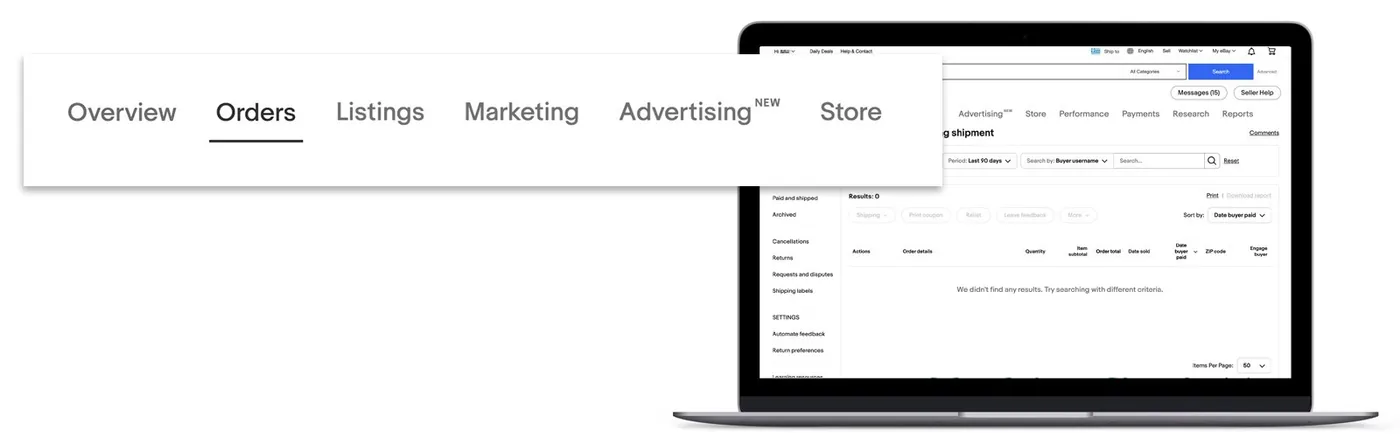
Orders
Orders is where fulfillment happens. You can filter by status, print shipping labels if you ship yourself, and upload tracking numbers. If your supplier ships for you, you paste their tracking into the order and eBay passes it to the buyer. Open requests such as cancellations, returns and payment disputes also live here. Answer these quickly, since slow responses count against you.
Listings
Listings holds active, scheduled, draft and ended items, with filters and a bulk-edit option. The reason it matters for dropshipping is price and stock hygiene. If a supplier raises a price or runs out of stock, you want to change a batch of listings in minutes, not open each one. eBay also gives you up to 250 listings a month with no insertion fee, after which each listing is $0.35, so it pays to end dead listings rather than let them pile up.
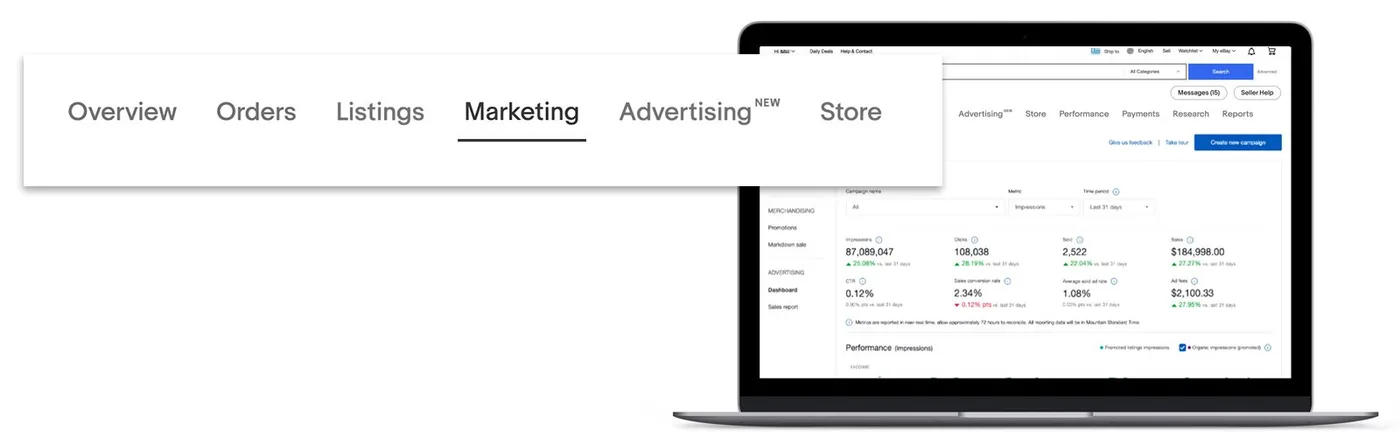
Marketing and Advertising
These two tabs are easy to confuse. Marketing covers discounts you give buyers: volume pricing, sale events, coupons and buyer groups. Advertising covers paid placement, including Promoted Listings, where you pay to get items seen. Run Promoted Listings on products that already convert, and use Marketing discounts to lift average order value on items with a decent margin. Our guide to eBay product research tools covers how to choose which products deserve ad money.
Store
The Store tab only does anything once you subscribe to an eBay Store. Subscribers manage their store categories, layout and traffic stats here, and get more free listings. Most new dropshippers skip a Store at the start and add one when listing volume or fee savings justify the subscription cost. Check eBay's current Store pricing before deciding.
Performance
This tab shows your sales, traffic, seller level and how your service metrics compare with similar sellers. eBay places sellers into levels (Top Rated, Above Standard and Below Standard) based on a monthly review of cases closed without seller resolution, transaction defect rate and late shipment rate. See eBay's page on seller levels and performance standards for the thresholds that apply to you. For dropshippers, late shipment is the metric that causes the most trouble because it depends on a supplier you do not control.
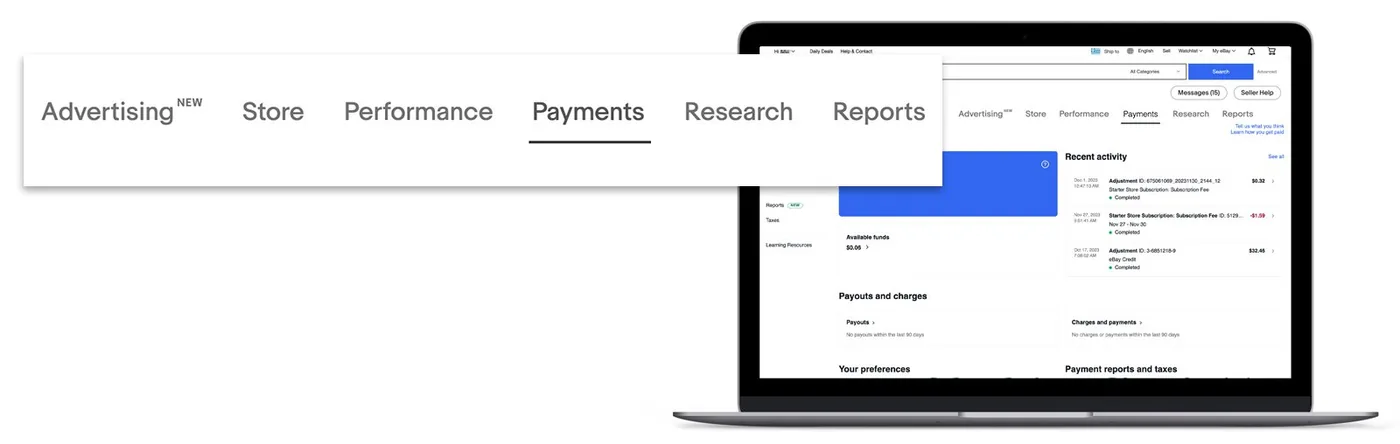
Payments
Payments lists your payouts, the transactions behind them and the fees taken. It is where you confirm that what eBay paid out matches what you expected after final value fees and ad fees. Download the transaction report monthly and match it to your supplier invoices, so you know your real margin per order and not the one you estimated.
Research
Research gives you data on what is selling, at what prices and how fast. Use it before you list a product, not after. Check that completed sales exist in the price range you plan to charge, and that the sell-through is healthy. If few items sell at your price, no amount of ad spend will fix it.
Reports
Reports works with CSV and XLSX files. You download your listings or orders, edit them in a spreadsheet, and upload them back, which is the fastest way to change hundreds of listings at once. It also lets you set up recurring reports for your bookkeeping.
Seller Hub fees: a worked example
The fees you see in Payments depend on category, but for most categories eBay's current fee page lists a final value fee of 13.6% of the total sale amount up to $7,500, plus 2.35% on the portion above that, and a per-order fee of $0.30 on orders of $10 or under and $0.40 on orders above $10. Check the eBay selling fees page for your category, since some differ and the figures change over time.
Here is a dropshipped order worked through with those figures. The buyer pays $40 for the item plus $6 shipping, a $46 order:
| Line | Amount |
|---|---|
| Order total (item $40 + shipping $6) | $46.00 |
| Final value fee (13.6% of $46) | -$6.26 |
| Per-order fee (order over $10) | -$0.40 |
| Promoted Listings ad fee (assumed 4%) | -$1.84 |
| Supplier cost including shipping (assumed) | -$22.00 |
| Profit | $15.50 |
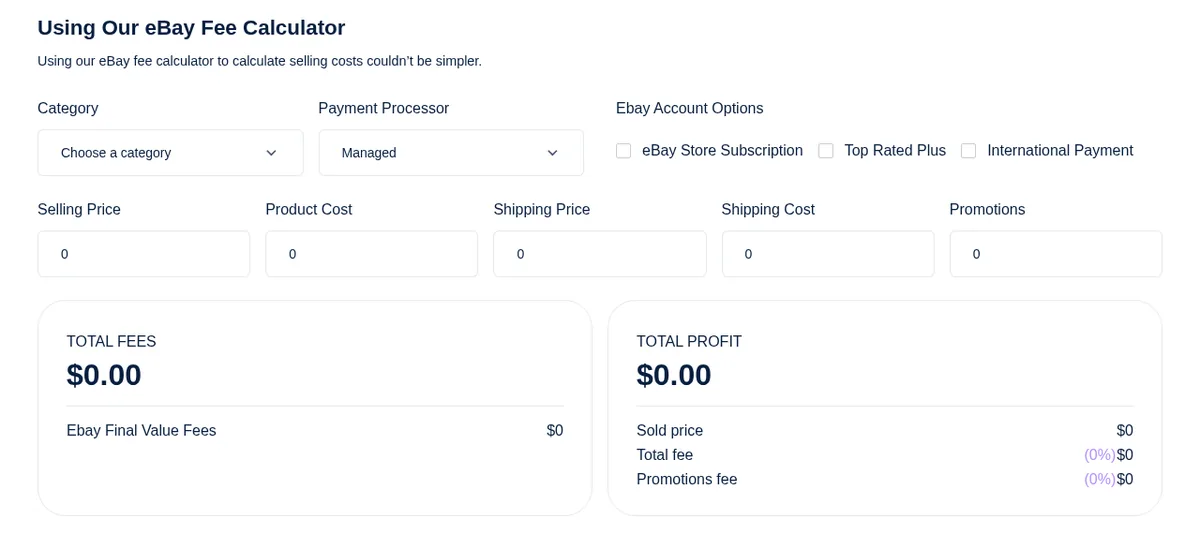
Fees took about $8.50 of the $46, roughly 18%, before the product cost. That is why you run the maths before listing, not after. Use Spocket's eBay fees calculator, which takes your category, selling price, product cost and shipping, and returns total fees and profit.
Can you dropship on eBay with Seller Hub?
Yes, with conditions. eBay allows dropshipping, but it holds you responsible for the buyer experience whoever ships the parcel. The risky version is buying from a retailer such as Amazon or Walmart after a sale and having them ship to your buyer. That is widely reported as a policy violation and a common route to listing removals and account restrictions. The safe version is a wholesale supplier you have an arrangement with, shipping with neutral packaging. Read eBay's own drop shipping policy in the Help centre before listing your first item. For the full set-up, see our guides on how to start dropshipping on eBay and AliExpress to eBay dropshipping.
A weekly Seller Hub routine for dropshippers
- Daily, Overview and Orders: clear anything awaiting tracking, answer messages and requests.
- Twice a week, Listings: end sold-out items, fix prices where supplier costs moved.
- Weekly, Performance: check late shipment, defect rate and cases. If one climbs, find the supplier behind it.
- Weekly, Advertising: pause ads on items that spend without selling.
- Monthly, Payments and Reports: download the transaction report and reconcile it against supplier invoices.
Seller Hub or My eBay?
They overlap, which confuses new sellers. My eBay is the buyer-side home: purchases, watchlist, saved searches and messages. Seller Hub is where selling tools live, and eBay has been moving selling features into it for years. If you are looking for a setting that has to do with your listings, orders, payouts or seller level, look in Seller Hub first. Messages and account details still sit in the wider account area, so you will move between the two.
Set up Seller Hub for your first dropshipped listing
- Check the listing site shown at the top of the page. A mismatch sends your listing to the wrong marketplace.
- Research the product. Open Research and look at what similar items actually sold for. Write down the lowest price at which sales happen.
- Run the fee maths. Use the fee calculator with your supplier cost and shipping, and drop any product that leaves you less than a margin you can live with after ads.
- Create the listing. In Listings, choose Create listing, add your own photos where you can, and write a plain title that uses the words buyers search for.
- Set handling time to what your supplier really delivers, plus a day of buffer, not what looks attractive.
- Check Payments so your payout details are in place before the first sale.
- Watch the first order end to end. Add tracking in Orders the day the supplier ships, and note how long delivery really took.
When Seller Hub shows a problem
Most seller problems arrive as a number moving the wrong way in Performance or a new request in Orders. Here is how to read the common ones:
| What you see | Usual cause for a dropshipper | Fix |
|---|---|---|
| Late shipment rate rising | Supplier processing slower than your handling time | Lengthen handling time on those items or change supplier |
| Cases closed without your resolution | Buyer opened a case and you did not respond in time | Check Orders daily and reply to requests the same day |
| Transaction defects | Wrong item, damaged parcel or missing delivery | Refund or replace fast, then trace the cause with the supplier |
| Sales dropping on a once-strong item | Competitors cut price, or you ran out of stock | Check Research for the current price range and confirm supplier stock |
| Payout lower than expected | Ad fees, returns or fee categories not included in your estimate | Open the transaction report in Payments and match it line by line |
The pattern behind most of these is the same: the problem starts with a supplier or a promise, and Seller Hub is where it first becomes visible. Check the dashboard on a schedule rather than waiting for an email.
Where Spocket fits
Spocket connects to eBay, so you can import products from its suppliers, many of them based in the US and EU, and list them without copying details by hand. Orders can be fulfilled automatically and carry your branded invoice, and the US and EU suppliers advertise 2 to 7 day shipping, which helps with the late-shipment metric you track in Performance. Treat shipping times as something to check with a test order. See the eBay integration, browse trending products, or read our general guide on how to sell on eBay. Plans start at $39.99 a month with a 7-day trial, and you can start the trial here.
Common Seller Hub mistakes
- Ignoring Performance until you get a warning. By then your seller level is already affected.
- Setting a handling time your supplier cannot meet. It is the most common cause of late shipments.
- Editing listings one at a time. Use bulk edit and Reports for anything over a handful.
- Judging profit from the sale price. Judge it from the Payments tab, after fees, ads and supplier cost.
- Promoting everything. Ads on a product with no sales just add a cost to a product that does not convert.
- Skipping Research. Listing first and checking demand later wastes listing slots.
Get your first month right
One habit separates sellers who grow from those who stall: they treat Seller Hub as a spreadsheet of their business, not a place to react to emails. Write down three numbers every Friday, your late shipment rate, your total fees as a share of sales, and your profit per order after supplier cost. If any of them drifts for two weeks in a row, change something small, such as a handling time, a price or a supplier, and watch whether the number moves. Small, tracked changes beat big, guessed ones.
For your first month, keep it small: ten listings you have researched, handling times you have tested, and a weekly pass through Performance and Payments. Once those numbers look healthy you can add listings, ads and a Store. When you are ready to source products, start your Spocket trial and connect it to your eBay account.
Start your dropshipping business today
eBay Seller Hub FAQs
What is eBay Seller Hub?
Seller Hub is eBay's free control centre for sellers. It brings your orders, listings, promotions, advertising, seller performance, payouts and research into one dashboard. You use it to manage everyday selling tasks, from adding tracking numbers to bulk-editing listings, and to see how your business is performing.
How do I access eBay Seller Hub?
Sign in to your eBay seller account and open Seller Hub from your account menu. The tabs run across the top of the page. If you sell on more than one eBay marketplace, use the listing-site selector at the top to switch between them.
Is eBay Seller Hub free?
Yes, Seller Hub itself is free to use. You pay eBay's normal selling fees, such as the final value fee and per-order fee, plus optional costs like Promoted Listings and a Store subscription. Check eBay's current selling fees page for the rates that apply to your category.
What are the tabs in eBay Seller Hub?
The main tabs are Overview, Orders, Listings, Marketing, Advertising, Store, Performance, Payments, Research and Reports. Overview is the dashboard, Orders handles sales and tracking, Listings manages items, Marketing and Advertising cover discounts and paid promotion, and Payments covers payouts and fees. Names and layout can change over time.
What is the difference between Marketing and Advertising in Seller Hub?
Marketing covers discounts and offers you give buyers, such as volume pricing, sale events and buyer groups. Advertising covers paid placement, including Promoted Listings, where you pay to increase visibility. Use Marketing to raise order value on healthy-margin items and Advertising on products that already convert.
How do I upload tracking numbers in Seller Hub?
Open the Orders tab, find the order, and add the carrier and tracking number from your supplier or shipping label. eBay passes the tracking to the buyer. Upload it as soon as the supplier ships, because timely tracking protects your late-shipment rate and cuts "where is my order" messages.
Can I use Seller Hub for dropshipping?
Yes, many dropshippers run their whole eBay business from it. Use Listings and Reports for bulk edits, Orders for tracking, Performance for seller level and Payments for reconciling fees. eBay holds you responsible for the buyer experience, so follow its drop shipping policy and source from suppliers you have an arrangement with.
How do I calculate my eBay fees?
Add the final value fee, the per-order fee and any ad fee to your supplier cost, then compare the total to the order amount. Spocket's eBay fees calculator does this from your category, selling price, product cost and shipping. Confirm your category's rates on eBay's selling fees page.


Launch your dropshipping business now!
Start free trial


Related blogs

What Is Ecommerce? Definition, Types and Models
What is ecommerce? Learn the definition, types (B2C, B2B, D2C), business models, and 2026 US Census data, plus how to work out profit on a single order.


Top WordPress eCommerce Themes for 2026
Explore the best WordPress eCommerce themes for 2026. Compare WooCommerce themes by speed, design, features, and dropshipping potential.

Saba Mohebpour Didn't Stop at Spocket: His New $50M Fund, ILA Capital, Is Buying Up Shopify and Amazon Apps
After building Spocket into a major ecommerce platform, Saba Mohebpour is launching ILA Capital with a $50M strategy to acquire Shopify and Amazon apps powering modern ecommerce.