


Top Airtable Alternatives for Better Workflow Management
Explore the best Airtable alternatives for better workflow management. Compare features, pricing styles, and top picks for teams and ecommerce ops.

.avif)

If you’re researching airtable alternatives, you’re probably in one of these situations:
- Your team has outgrown Airtable’s structure or pricing.
- You need stronger workflow features like project tracking, approvals, dashboards, or reporting.
- You want a database-first tool that feels more like an app, not just a spreadsheet.
- You’re trying to reduce tool sprawl and bring docs, tasks, and structured data into one place.
Airtable is often described as a hybrid of spreadsheet + database with multiple views (grid, calendar, Kanban, forms) and automation features. That flexibility is exactly why it’s popular, but it’s also why teams start looking for alternatives when workflows become more complex.
This guide breaks down the best airtable alternatives for workflow management, explains how to choose the right one, and compares options across project management tools, database-first platforms, and spreadsheet-style systems.
What to look for in Airtable alternatives
Before choosing a tool, get clear on what you actually need Airtable to do for you. Most teams switch because of one (or more) of these gaps:
Workflow structure that scales
Airtable can become messy when you’re managing cross-functional workflows (marketing + ops + finance) with multiple dependencies. Strong alternatives offer:
- Built-in task management and dependencies
- Standard operating workflows (intake → approval → execution)
- Permissions that scale by team, department, or client
Reporting and dashboards
If leadership wants visibility, you’ll need dashboards, rollups, workload views, and automated reporting beyond basic charts.
Automations and integrations
Airtable’s automations are helpful, but many teams want deeper “if-this-then-that” logic, easier integration libraries, or native automation across tasks + docs + data.
User experience and adoption
The best tool is the one your team will actually use daily. Many Airtable replacements win simply by being easier to onboard.
Pricing that matches usage
Airtable-based workflows often grow fast, and cost can rise quickly when more collaborators need access.
Quick comparison of top Airtable alternatives
Below is a practical shortlist, grouped by “what they’re best at.” (If you want a database-first replacement, don’t default to a project tool, and vice versa.)
Best for work management (projects + processes)
- SmartSuite
- monday.com
- ClickUp
- Smartsheet
Best for database-style tables (Airtable-like)
- Zoho Tables
- Stackby
- Rows
- Google Sheets (with add-ons / Apps Script)
Best for no-code / internal app building
- Tadabase
- NocoDB (open-source Airtable-style)
- Baserow (open-source, Airtable-like)
Best for docs + databases combined
- Notion
- Coda
Top 13 Airtable Alternatives
If you need a reliable list of airtable alternatives that fit different workflows, budgets, and team sizes, this section breaks down the top options worth considering. From full-scale work management platforms to database-style tools and no-code app builders, these Airtable competitors help you organize data, automate processes, and collaborate more efficiently. Use the list below to quickly identify which tool matches your workflow needs best.
The best Airtable alternatives for workflow management
1) SmartSuite
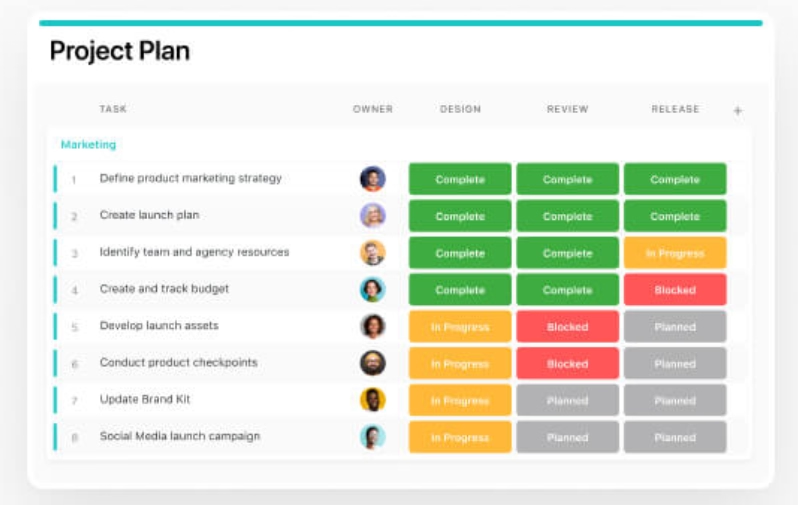
SmartSuite positions itself as a work management platform with structured workflows and automation, and it’s frequently listed as a top Airtable alternative for teams that want “work OS” features beyond a database.
Best for:
- Teams that want Airtable-like flexibility but stronger process/workflow structure
- Ops teams managing intake, approvals, and execution in one place
When it’s a strong choice:
- You need workflows that feel like systems, not just tables
- You want built-in work management features without building everything from scratch
2) monday.com
monday.com is widely used for workflow management, especially when teams want a clear “board-based” system that’s easy to onboard and manage across departments. SmartSuite’s roundup includes monday.com as a key alternative.
Best for:
- Marketing, operations, and cross-functional project workflows
- Teams that need strong visibility and status tracking
Watch-outs:
- If you’re looking for database-first relational modeling, monday.com can feel more “project board” than “database.”
3) ClickUp
ClickUp often wins when teams want tasks, docs, dashboards, and automation in one tool. It’s listed as a leading Airtable alternative in multiple roundups.
Best for:
- Teams that want deep project management + flexible data views
- Fast-growing companies trying to consolidate tools
Why it can be better than Airtable:
- More opinionated project management layer
- Strong task-centric workflows for execution
4) Smartsheet
Smartsheet is a spreadsheet-style work management tool that’s often chosen by teams that want structured project delivery, reporting, and operational visibility. Zapier’s and SmartSuite’s lists both include Smartsheet as an Airtable alternative.
Best for:
- PMOs, operations, and teams that live in “sheets,” but need workflows
- Stakeholder reporting and structured delivery
Best use case:
- When you want Airtable-like organization, but prefer spreadsheets and enterprise-style reporting.
The best Airtable-like database alternatives
If you like Airtable’s “tables + views + forms” style but want different pricing, better fit, or a simpler experience, these are strong airtable alternatives.
5) Zoho Tables

Zoho’s Airtable alternatives guide frames Airtable as a work management + no-code platform with views, collaboration, and automation. If your goal is a similar model, Zoho Tables is designed as a direct competitor under the Zoho ecosystem.
Best for:
- Teams already using Zoho apps
- Organizations that want structured tables, permissions, and workflows in one ecosystem
Why teams choose it:
- Integrated ecosystem benefits if you’re already on Zoho
- Competitive alternative positioning to Airtable
6) Stackby
Zapier calls Stackby a direct Airtable-style alternative and highlights it as an affordable pick.
Best for:
- People who want Airtable-like functionality with a simpler or more affordable path
- Teams that don’t need advanced enterprise controls
7) Rows
Rows is often grouped among Airtable alternatives for teams that want spreadsheet flexibility with modern integrations/connectors. It appears in SmartSuite’s Airtable alternatives list. For teams using Rows to manage data but needing cross-platform workflow sync, Exalate – Jira to ServiceNow can automatically sync tasks, tickets, and updates between systems, keeping everyone aligned without extra manual work. It appears in SmartSuite’s Airtable alternatives list.
Best for:
- Spreadsheet-first teams that still want modern workflow capability
- Teams that build reporting and light automations around data
8) Google Sheets (plus automation)
Google Sheets remains a practical alternative when the main need is accessible, lightweight data management. It’s frequently included in Airtable alternatives lists, especially when budget and adoption matter.
Best for:
- Very small teams, early-stage workflows, or simple trackers
- Anyone who needs universal shareability
When it’s not enough:
- When you need permissions, relational data, robust workflow automations, or audit-grade governance.
Best Airtable alternatives for no-code apps and internal tools
Some teams don’t just want a database. They want to build internal tools (portals, dashboards, client-facing apps, approval systems). That’s where no-code builders shine.
9) Tadabase
Tadabase publishes a detailed Airtable alternatives list and positions itself strongly for building applications on top of your data.
Best for:
- Building internal portals, apps, and workflows beyond “tables”
- Teams that want a more app-like experience than Airtable provides
When it’s a great Airtable replacement:
- You’re using Airtable as a backend and constantly fighting view limitations
- You want real user roles, app navigation, and structured UI
10) NocoDB (open-source)
If vendor lock-in is a concern, open-source Airtable-like tools can be compelling. NocoDB appears in modern Airtable alternative discussions as an open-source option that mimics Airtable-style workflows.
Best for:
- Technical teams or organizations that prefer self-hosting
- Teams that want a flexible “Airtable clone” style system
11) Baserow (open-source)
Tadabase’s list highlights Baserow as one of the more faithful open-source Airtable-style replacements, with self-hosted and cloud options.
Best for:
- Teams that want an Airtable-like interface without Airtable dependency
- Organizations with engineering support or open-source preference
Best Airtable alternatives for docs + structured data
Some teams don’t need a “pure database” tool. They want a workspace where docs and data live together.
12) Notion
Notion is frequently listed as an Airtable alternative because it blends docs, wikis, and lightweight databases in one space.
Best for:
- Knowledge + tracking in one tool
- Editorial calendars, content pipelines, internal wikis tied to structured data
Watch-outs:
- It can be less robust for complex relational databases or heavy automations compared to database-first tools.
13) Coda
Zapier includes Coda as an Airtable alternative, positioning it as a document-based tool with powerful tables and automation capabilities.
Best for:
- Teams who want workflows embedded in docs
- Collaborative “living documents” that also function like apps
How to choose the best Airtable alternative for your workflow
Choosing the right Airtable alternative starts with understanding how your team actually works. Different tools excel at different things—some are built for structured project execution, others focus on databases, internal apps, or documentation-driven workflows. By evaluating your workflow complexity, collaboration needs, automation requirements, and long-term scalability, you can select a platform that supports your processes instead of forcing your team to work around tool limitations.
Use this decision filter. It prevents “tool regret.”
Choose SmartSuite, monday.com, ClickUp, or Smartsheet if
- Your primary need is project delivery, process management, approvals, and visibility
- You want dashboards and operational reporting without building from scratch
Choose Zoho Tables, Stackby, Rows, or Google Sheets if
- You mainly need structured data organization and views
- You want something closer to Airtable’s mental model
Choose Tadabase (or open-source like Baserow/NocoDB) if
- You need internal apps, portals, or an app-like workflow UX
- You want more control over how users interact with data
Choose Notion or Coda if
- Your workflows are tightly connected to docs, SOPs, content, and knowledge sharing
- You want “docs + data” as one system
Workflow examples (including ecommerce ops)
If you’re running ecommerce operations, Airtable is often used for product tracking, content workflows, supplier research, order exceptions, and internal approvals. If you’re using Spocket for product sourcing/supplier workflows, your operational system typically needs to track:
- Product research status (shortlist → review → import → launch)
- Supplier notes, margins, shipping expectations
- Storefront content workflow (images, titles, descriptions, SEO fields)
- Issue tracking (out-of-stock, shipping delays, refunds)
Here’s how different airtable alternatives fit that reality:
- ClickUp: Great if you want your product launch pipeline and task execution in one place.
- monday.com: Great for visibility and simple operations boards.
- SmartSuite: Strong for structured operational workflows with status-driven processes.
- Zoho Tables: Good for maintaining structured supplier/product databases.
- Notion: Great if your team needs SOPs and product launch documentation tightly linked to trackers.
The best move is aligning your tool to the “center of gravity” of your workflow: tasks, data, apps, or docs.
Migration tips (so switching tools doesn’t break your workflows)
Moving from Airtable can be painless if you do it in stages.
Step 1: Audit your bases
List each base and tag it:
- “Mission critical”
- “Nice to have”
- “Deprecated / unused”
Step 2: Map your objects
Most setups boil down to:
- Projects / requests
- People / owners
- Assets / deliverables
- Statuses / stages
- Automations / notifications
Step 3: Export clean data
Export CSVs, but also document:
- Field types (single select vs multi select vs formula)
- Views your team relies on
- Automations and triggers
Step 4: Rebuild workflows before importing everything
Don’t import 100% of data first. Build the workflow skeleton, validate it with your team, then bring in historical records.
Conclusion
Choosing among airtable alternatives comes down to one thing: what your workflow is really centered on.
- If you need robust workflow execution, pick a work management tool like SmartSuite, ClickUp, monday.com, or Smartsheet.
- If you love Airtable’s “database with views” model, look at Zoho Tables, Stackby, Rows, or even Google Sheets for lighter use cases.
- If you want internal apps, portals, or deeper UX control, Tadabase (and open-source tools like Baserow/NocoDB) are worth serious consideration.
And if your workflows include ecommerce operations (product pipelines, supplier tracking, launch checklists), the right Airtable replacement can give your team clearer execution and better visibility alongside tools you already use, including Spocket.
Start your dropshipping business today
FAQs about Airtable alternatives
What is the best Airtable alternative for workflow management?
If you want stronger workflow and work management features, tools like SmartSuite, ClickUp, monday.com, and Smartsheet are frequently shortlisted as Airtable alternatives.
Which Airtable alternatives are closest to Airtable’s database style?
Zoho Tables, Stackby, Rows, and Google Sheets (with add-ons/automation) are commonly used when teams want a table-first experience similar to Airtable.
Are there any open-source Airtable alternatives?
Yes. Baserow and NocoDB are often mentioned as open-source options for teams that want an Airtable-like approach with more control and less vendor lock-in.
Which Airtable alternative is best for building internal apps?
Tadabase is frequently positioned for building no-code apps and portals on top of structured data, making it a strong choice when you’ve outgrown “tables only.”
Which Airtable alternative is best for ecommerce and operations teams?
For ecommerce and operations workflows, tools like ClickUp, SmartSuite, and monday.com work well for managing product pipelines, approvals, and execution, while database-style tools like Zoho Tables or Notion are useful for tracking product data, suppliers, and content workflows alongside ecommerce platforms such as Spocket.


Launch your dropshipping business now!
Start free trial


Related blogs

Dripshipper Reviews: Is This Coffee Dropshipping Platform Worth It?
Read this detailed Dripshipper review covering features, pros, cons, pricing, customer feedback, profitability, and better dropshipping alternatives.


Is BigBuy Legit? Honest Review for Dropshipping Businesses
Find out if BigBuy is a reliable dropshipping supplier, including its features, pros, cons, pricing concerns, reviews, and alternatives for ecommerce sellers.

What is Micromarketing and How to Use it Effectively
Learn what micromarketing is, how it works, its benefits, examples, and how ecommerce businesses can use it to target niche customers effectively.
